Let's say you write a Python function in Polars. But some of your teammates use pandas, and others use DuckDB. How do you make it work for everyone?
One way is to write the conditional logic to handle each library.
def ffill_by_store(df):
    if isinstance(df, pd.DataFrame):
        ...  # pandas code
    elif isinstance(df, pl.DataFrame):
        ...  # Polars code
    elif isinstance(df, duckdb.DuckDBPyRelation):
        ...  # DuckDB code
    elif ...:
        ...  # one more library, one more branch
However, this means you need to maintain and test each branch. You also need to check that every branch gives the same answer, which takes a lot of effort.
What if you could write the function once, in Polars syntax, and have it run on all of them?
In this article, you will use Narwhals to write that function once and keep it working as these libraries change.
💻 Get the Code: The functions and tests are on GitHub.
What Is Narwhals?
Narwhals is a lightweight layer that lets you write dataframe code in Polars syntax and run it on many libraries such as pandas, Polars, and DuckDB.
Libraries such as scikit-learn, Plotly, Altair, and marimo already use Narwhals to accept any dataframe their users pass in (full list).
For more background on Narwhals, see Narwhals: Unified DataFrame Functions for pandas, Polars, and PySpark and Writing Portable DataFrame Code for Eager and Lazy Execution.
Setup
Install Narwhals with the libraries used in this article.
pip install "narwhals>=2.28" pandas polars duckdb pyarrow pytest datafusion
This article uses narwhals v2.28.0.
Let's create a small sales table for two stores. Each store has one missing sales value.
from datetime import datetime

data = {
    "sale_date": [datetime(2025, 5, day) for day in (22, 23, 24, 22, 23, 24)],
    "store": ["Thimphu"] * 3 + ["Paro"] * 3,
    "sales": [1100, None, 1450, 501, 500, None],
}
| sale_date | store | sales |
|---|
| 2025-05-22 | Thimphu | 1100 |
| 2025-05-23 | Thimphu | null |
| 2025-05-24 | Thimphu | 1450 |
| 2025-05-22 | Paro | 501 |
| 2025-05-23 | Paro | 500 |
| 2025-05-24 | Paro | null |
Create the same data in each library.
import duckdb
import pandas as pd
import polars as pl

df_pandas = pd.DataFrame(data)                      # pandas DataFrame
df_polars = pl.DataFrame(data)                      # Polars DataFrame, runs right away
lf_polars = pl.LazyFrame(data)                      # Polars LazyFrame, runs only when collected
duckdb_rel = duckdb.sql("SELECT * FROM df_polars")  # DuckDB relation, also lazy
Accept Any DataFrame
Start with a forward-fill function in plain Polars. It fills each missing sales value with the previous value from the same store.
import polars as pl

def ffill_by_store(df: pl.DataFrame) -> pl.DataFrame:
    return df.with_columns(
        pl.col("sales")
        .fill_null(strategy="forward")
        .over("store", order_by="sale_date")
    )
Apply it to a Polars DataFrame:
print(ffill_by_store(df_polars))
shape: (6, 3)
┌─────────────────────┬─────────┬───────┐
│ sale_date           ┆ store   ┆ sales │
│ ---                 ┆ ---     ┆ ---   │
│ datetime[μs]        ┆ str     ┆ i64   │
╞═════════════════════╪═════════╪═══════╡
│ 2025-05-22 00:00:00 ┆ Thimphu ┆ 1100  │
│ 2025-05-23 00:00:00 ┆ Thimphu ┆ 1100  │
│ 2025-05-24 00:00:00 ┆ Thimphu ┆ 1450  │
│ 2025-05-22 00:00:00 ┆ Paro    ┆ 501   │
│ 2025-05-23 00:00:00 ┆ Paro    ┆ 500   │
│ 2025-05-24 00:00:00 ┆ Paro    ┆ 500   │
└─────────────────────┴─────────┴───────┘
The two missing values now hold the previous sale from the same store. But a pandas DataFrame fails:
ffill_by_store(df_pandas)
AttributeError: 'DataFrame' object has no attribute 'with_columns'
To make it work for any library, change three things:
- Convert the input to a Narwhals frame with
nw.from_native
- Use
nw.col instead of pl.col
- Convert the result back with
to_native
import narwhals as nw
from narwhals.typing import IntoFrameT

def ffill_by_store(df_native: IntoFrameT) -> IntoFrameT:
    return (
        nw.from_native(df_native)  # added: convert to a Narwhals frame
        .with_columns(
            nw.col("sales")  # changed: pl.col -> nw.col
            .fill_null(strategy="forward")
            .over("store", order_by="sale_date")
        )
        .to_native()  # added: convert back to the caller's type
    )
Now try the same pandas DataFrame that failed before:
print(ffill_by_store(df_pandas))
   sale_date    store   sales
0 2025-05-22  Thimphu  1100.0
1 2025-05-23  Thimphu  1100.0
2 2025-05-24  Thimphu  1450.0
3 2025-05-22     Paro   501.0
4 2025-05-23     Paro   500.0
5 2025-05-24     Paro   500.0
It returns a pandas DataFrame with the same filled values as the Polars version without writing any pandas code.
Under the hood, from_native detects the library. Narwhals then translates your code into that library's own operations. to_native gives you back the original type.
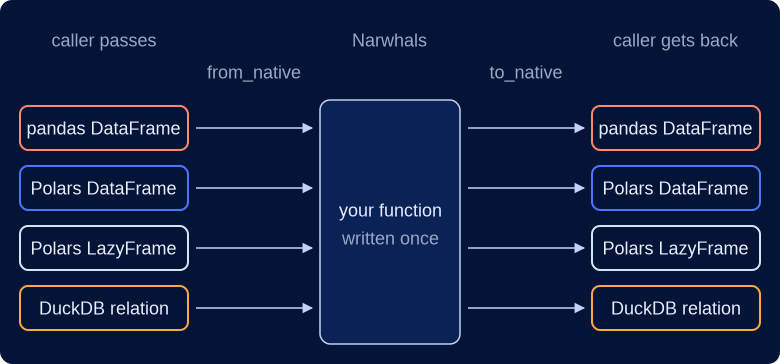
Each input comes back as the same type it went in, so callers can keep using their own library's methods like normal down the line. Lazy inputs stay lazy, and eager inputs stay eager.
Simplify the Conversion with a Decorator
Calling from_native and to_native adds two lines to every function. The @nw.narwhalify decorator does both for you, so the body stays almost the same as the original Polars code:
@nw.narwhalify
def ffill_by_store(df):
    return df.with_columns(
        nw.col("sales")  # still use nw.col instead of pl.col
        .fill_null(strategy="forward")
        .over("store", order_by="sale_date")
    )
Get the Same Answer on Every Library
Users expect a function to give the same answer on every library. Some lazy backends, like DuckDB, don't guarantee row order the way Polars LazyFrame does. So for any lazy input, Narwhals asks you to set the order for operations that depend on it.
To see why, let's get each store's latest sale in DuckDB:
query = "SELECT store, last(sale_date)::DATE AS sale_date, last(sales) AS sales FROM {} GROUP BY store ORDER BY store"
print(duckdb.sql(query.format("df_polars")))
┌─────────┬────────────┬───────┐
│  store  │ sale_date  │ sales │
│ varchar │    date    │ int64 │
├─────────┼────────────┼───────┤
│ Paro    │ 2025-05-24 │  NULL │
│ Thimphu │ 2025-05-24 │  1450 │
└─────────┴────────────┴───────┘
Both stores return their May 24 row, the latest date in the data. Reversing the rows doesn't change the latest date, so you'd expect the same answer:
reversed_rows = df_polars.reverse()  # same rows, last row first
print(duckdb.sql(query.format("reversed_rows")))
┌─────────┬────────────┬───────┐
│  store  │ sale_date  │ sales │
│ varchar │    date    │ int64 │
├─────────┼────────────┼───────┤
│ Paro    │ 2025-05-22 │   501 │
│ Thimphu │ 2025-05-22 │  1100 │
└─────────┴────────────┴───────┘
But the second query returns May 22 instead of the latest date, May 24. That's because last() without an order takes whichever row DuckDB reads last, not the row with the latest date.
Narwhals prevents this by requiring you to specify the order to use. If you try to take the last value without specifying the order, Narwhals raises an error:
def last_sale_per_store(df_native: IntoFrameT) -> IntoFrameT:
    return (
        nw.from_native(df_native)
        .group_by("store")
        .agg(nw.col("sales").last())
        .to_native()
    )

last_sale_per_store(duckdb_rel)
InvalidOperationError: Order-dependent expressions are not supported for use in LazyFrame.

Hint: To make the expression valid, specify `order_by`.
...
 - Instead of `nw.col('price').first()` write `nw.col('price').first().over(order_by='date')`
   or `nw.col('price').first(order_by='date')`.
Raising an error instead of silently returning a wrong number helps you catch the problem while writing the function, not in production. To get the same answer every time, pass order_by to sort each store's rows by sale_date before taking the last one.
def last_sale_per_store(df_native: IntoFrameT) -> IntoFrameT:
    return (
        nw.from_native(df_native)
        .group_by("store")
        .agg(nw.col("sales").last(order_by="sale_date"))
        .sort("store")
        .to_native()
    )

last_sale_per_store(duckdb_rel)
┌─────────┬───────┐
│  store  │ sales │
│ varchar │ int64 │
├─────────┼───────┤
│ Paro    │  NULL │
│ Thimphu │  1450 │
└─────────┴───────┘
Other operations that depend on row order, such as first() and cum_sum(), need an order too:
nw.col("sales").first(order_by="sale_date")
nw.col("sales").cum_sum().over(order_by="sale_date")
Test the Function on Every Backend
How do you test a universal function on every backend? Writing a separate assert for each library takes time and effort.
Narwhals' assert_frame_equal works for pandas, Polars, and DuckDB. Convert the result and the expected frame to Narwhals frames, then compare them.
from narwhals.testing import assert_frame_equal

result_narwhals = nw.from_native(ffill_by_store(df))  # result as a Narwhals frame
expected_narwhals = nw.from_native(expected)          # expected as a Narwhals frame
assert_frame_equal(result_narwhals, expected_narwhals)  # compare the two
One way to test every library is pytest.mark.parametrize, which runs one test per backend:
import pytest
from narwhals.testing import assert_frame_equal

expected_data = {**data, "sales": [1100, 1100, 1450, 501, 500, 500]}
expected_polars = pl.DataFrame(expected_data)


@pytest.mark.parametrize(
    "df, expected",
    [
        (df_pandas, pd.DataFrame(expected_data)),
        (df_polars, expected_polars),
        (lf_polars, expected_polars.lazy()),
        (duckdb_rel, duckdb.sql("SELECT * FROM expected_polars")),
    ],
    ids=["pandas", "polars", "polars-lazy", "duckdb"],
)
def test_ffill_by_store(df, expected):
    result_narwhals = nw.from_native(ffill_by_store(df))
    expected_narwhals = nw.from_native(expected)
    assert_frame_equal(result_narwhals, expected_narwhals)
Run it with pytest -v:
test_ffill.py::test_ffill_by_store[pandas] FAILED
test_ffill.py::test_ffill_by_store[polars] PASSED
test_ffill.py::test_ffill_by_store[polars-lazy] PASSED
test_ffill.py::test_ffill_by_store[duckdb] PASSED

E   AssertionError: DataFrames are different (dtypes do not match)
    [left]: [Datetime(time_unit='us', time_zone=None), String, Float64]
    [right]: [Datetime(time_unit='us', time_zone=None), String, Int64]
The test passed on every backend except pandas. The pandas result has float sales, while the expected result has integers. This is because pandas turns the column into floats when there is NaN in the column.
If you had tested only on Polars and DuckDB, you would have missed this pandas problem.
To fix it, cast the column to an integer so the function returns the same type on every library.
def ffill_by_store(df_native: IntoFrameT) -> IntoFrameT:
    return (
        nw.from_native(df_native)
        .with_columns(
            nw.col("sales")
            .fill_null(strategy="forward")
            .over("store", order_by="sale_date")
            .cast(nw.Int64)
        )
        .to_native()
    )
Run the tests again, and every backend passes.
test_ffill.py::test_ffill_by_store[pandas] PASSED
test_ffill.py::test_ffill_by_store[polars] PASSED
test_ffill.py::test_ffill_by_store[polars-lazy] PASSED
test_ffill.py::test_ffill_by_store[duckdb] PASSED
The test is short and easy to read. If a library update breaks the function, the test will show which library causes the problem.
Add a Library with a Plugin
What if you want to use Narwhals with a library that is not supported out of the box? Narwhals supports plugins, which allow you to add a new backend to Narwhals.
To build a plugin, a package registers itself under the narwhals.plugins entry point in its pyproject.toml:
[project.entry-points."narwhals.plugins"]
my-library = "narwhals_my_library"
The narwhals_my_library module then implements Narwhals' frame and expression methods for your library. View the Extensions and plugins guide for more details.
Let's try narwhals-datafusion, a community plugin that adds DataFusion, a fast Apache query engine.
If you pass a DataFusion DataFrame to the function without the plugin, Narwhals recognizes it and tells you what to install.
from datafusion import SessionContext

ctx = SessionContext()
datafusion_df = ctx.from_pydict(data)
ffill_by_store(datafusion_df)
TypeError: Unsupported dataframe type, got: <class 'datafusion.dataframe.DataFrame'>

Hint: it looks like you passed a `datafusion.DataFrame` but don't have `narwhals-datafusion` installed.
Please refer to https://github.com/s5dsn-eqee/narwhals-datafusion for installation instructions.
Install the plugin based on the hint.
pip install "narwhals-datafusion==0.2.0"
Now the same function, with no edits, accepts the DataFusion DataFrame and returns one.
from datafusion import col

result = ffill_by_store(datafusion_df)
print(type(result))
result.sort(col("store"), col("sale_date"))  # DataFusion doesn't keep row order
<class 'datafusion.dataframe.DataFrame'>
+---------------------+---------+-------+
| sale_date           | store   | sales |
+---------------------+---------+-------+
| 2025-05-22T00:00:00 | Paro    | 501   |
| 2025-05-23T00:00:00 | Paro    | 500   |
| 2025-05-24T00:00:00 | Paro    | 500   |
| 2025-05-22T00:00:00 | Thimphu | 1100  |
| 2025-05-23T00:00:00 | Thimphu | 1100  |
| 2025-05-24T00:00:00 | Thimphu | 1450  |
+---------------------+---------+-------+
Plugins help in three ways:
- Supporting a new library takes one
pip install, with no change to your functions
- You can cover the new backend by simply adding one case to your parametrized test
- Library authors can build their own plugins instead of waiting for Narwhals to add support
Upgrade Engines Without Changing Your Code
Have you ever upgraded a library and your code broke? Recently, two major libraries, Polars 2.0 and DuckDB 2.0, changed behavior that existing code relied on. If your library supports both the old and new versions, you have to handle each change yourself, which is time-consuming and error-prone.
With Narwhals, many library upgrades don't change your results. The same code gives the same answer before and after the upgrade.
For example, in Polars 2.0, the explode function no longer produces a row with a null when the list is empty.
promos = pl.DataFrame(
    {"store": ["Thimphu", "Paro"], "promo": [["spring", "loyalty"], []]}
)
promos.explode("promo")
polars 1.44                      polars 2.1
┌─────────┬─────────┐            ┌─────────┬─────────┐
│ store   ┆ promo   │            │ store   ┆ promo   │
╞═════════╪═════════╡            ╞═════════╪═════════╡
│ Thimphu ┆ spring  │            │ Thimphu ┆ spring  │
│ Thimphu ┆ loyalty │            │ Thimphu ┆ loyalty │
│ Paro    ┆ null    │            └─────────┴─────────┘
└─────────┴─────────┘
With Narwhals, explode keeps the Polars 1.x behavior, even on Polars 2.1:
nw.from_native(promos).explode("promo").to_native()
┌─────────┬─────────┐
│ store   ┆ promo   │
│ ---     ┆ ---     │
│ str     ┆ str     │
╞═════════╪═════════╡
│ Thimphu ┆ spring  │
│ Thimphu ┆ loyalty │
│ Paro    ┆ null    │  ← kept on Polars 2.1
└─────────┴─────────┘
This way, library authors don't have to chase down bugs caused by the upgrade. If they want the new behavior, they can specify that in the code.
def explode_promos(df_native: IntoFrameT) -> IntoFrameT:
    return (
        nw.from_native(df_native)
        .filter(nw.col("promo").list.len() > 0)  # drop empty lists, like Polars 2.0
        .explode("promo")
        .to_native()
    )

explode_promos(promos)
┌─────────┬─────────┐
│ store   ┆ promo   │
│ ---     ┆ ---     │
│ str     ┆ str     │
╞═════════╪═════════╡
│ Thimphu ┆ spring  │
│ Thimphu ┆ loyalty │
└─────────┴─────────┘  ← same result as Polars 2.1
Protect Your Users with stable.v2
Narwhals protects your code from changes in pandas, Polars, and DuckDB. But Narwhals' own API can change too, so a Narwhals upgrade could break your code or change its output. To prevent this, import from narwhals.stable.v2. Narwhals promises never to change or remove any public function in this namespace.
import narwhals.stable.v2 as nw
So import from narwhals.stable.v2 in code that other people run. In code only you run, import from narwhals to get the newest features.
Final Thoughts
Overall, Narwhals lowers the cost of supporting many libraries, even as they change. You write a function once, your users keep the library they prefer, and upgrades need little extra work.