Polars 2.0 came out on October 6, 2026. The Polars team calls it a "boring" release because it mostly changes defaults instead of adding new APIs.
But boring doesn't mean minor. I think this release is exciting for two reasons:
- Your code gets faster without any changes.
- Polars now stops with an error instead of running with unexpected behavior, so you catch bugs early instead of debugging them later.
This post compares each change in Polars 1.x and 2.0 and explains why it matters.
The Streaming Engine Is the Default
Faster collect() With No Code Changes
In Polars 2.0, collect() runs lazy queries on the streaming engine instead of the in-memory engine.
To see why this matters, here is the difference between the two engines:
- in-memory: Runs each step on all the data before starting the next one
- streaming: Splits the data into chunks and passes each chunk through all the steps, so steps overlap
The figure below shows how each engine runs a query with three steps: filter, join, and group_by.
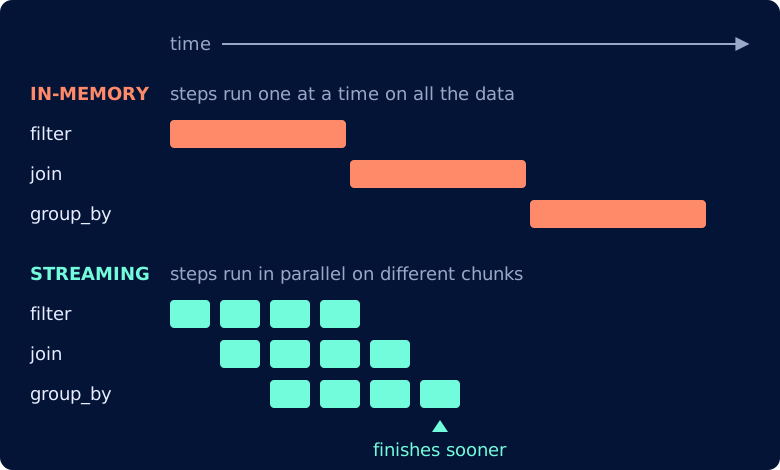
Because the steps overlap, the same query can finish sooner. To measure how much, download one month of NYC taxi trips and the zone lookup table, saved as taxi.parquet and taxi_zones.csv.
This post uses polars v2.0.0. The 1.x comparisons use polars v1.44.2.
The query below joins about 3 million trips to their pickup zones, then summarizes tips and trip lengths by borough and hour:
import polars as pl

trips = pl.scan_parquet("taxi.parquet")
zones = pl.scan_csv("taxi_zones.csv")

query = (
    trips.filter(pl.col("fare_amount") > 0, pl.col("trip_distance") > 0)
    .join(zones, left_on="PULocationID", right_on="LocationID")
    .with_columns(
        tip_rate=pl.col("tip_amount") / pl.col("fare_amount"),
        hour=pl.col("tpep_pickup_datetime").dt.hour(),
        minutes=(
            pl.col("tpep_dropoff_datetime") - pl.col("tpep_pickup_datetime")
        ).dt.total_minutes(),
    )
    .group_by("Borough", "hour")
    .agg(
        pl.len().alias("trips"),
        pl.col("tip_rate").median(),
        pl.col("minutes").quantile(0.9),
        pl.col("total_amount").sum(),
    )
    .sort("Borough", "hour")
)

summary = query.collect()
Running query.collect() 5 times in fresh processes on each Polars version and taking the median gives:
                 time     peak memory
polars 1.44.2    75 ms    564 MB
polars 2.0.0     52 ms    797 MB    <- 1.4x faster, but more memory
The same code runs about 1.4 times faster after the upgrade. You get this speed-up with no code changes.
Peak memory went up, which is expected because the streaming engine holds many chunks in memory at once. On a typical laptop with 16 GB of RAM or more, you won't notice the extra 233 MB.
Spill-to-Disk Is On
In Polars 1.x, queries ran on the in-memory engine unless you passed engine="streaming". That engine had to fit all the data in RAM, so a query too big for memory crashed the whole Python process.
Polars 2.0 instead writes intermediate data to disk when memory use reaches about 80% of RAM, so the query can finish. By default, it uses up to 64 GB of disk space for this.
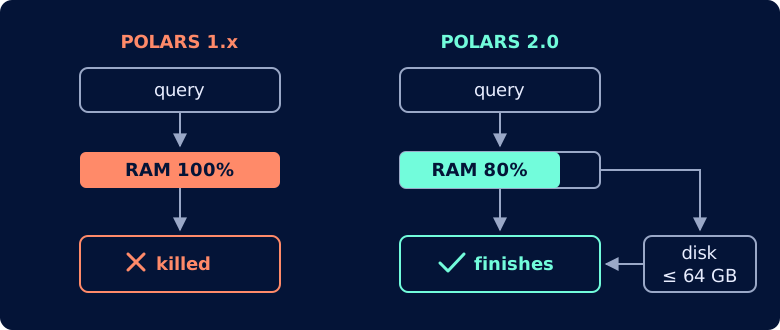
This covers sorts, window functions, and many expressions. Joins and group-bys can't spill yet, but the Polars team plans to add them next.
Joins No Longer Keep Row Order
The streaming engine finishes chunks in whatever order they're ready. Because of that, a join or group-by no longer returns rows in the input order.
To see this, number each trip with with_row_index, join it to the zones, and look at the first 5 rows:
joined = (
    trips.with_row_index("row")
    .join(zones, left_on="PULocationID", right_on="LocationID")
    .select("row", "tpep_pickup_datetime", "Zone")
)
joined.head(5).collect()
Polars 1.44.2 returns the first 5 trips of the file:
┌─────┬──────────────────────┬──────────────────────────────┐
│ row ┆ tpep_pickup_datetime ┆ Zone                         │
╞═════╪══════════════════════╪══════════════════════════════╡
│ 0   ┆ 2024-01-01 00:57:55  ┆ Penn Station/Madison Sq West │
│ 1   ┆ 2024-01-01 00:03:00  ┆ Lenox Hill East              │
│ 2   ┆ 2024-01-01 00:17:06  ┆ Upper East Side North        │
│ 3   ┆ 2024-01-01 00:36:38  ┆ East Village                 │
│ 4   ┆ 2024-01-01 00:46:51  ┆ SoHo                         │
└─────┴──────────────────────┴──────────────────────────────┘
Polars 2.0 doesn't return the first 5 trips, and each run can return a different set of rows:
┌─────────┬──────────────────────┬───────────────────────────────┐
│ row     ┆ tpep_pickup_datetime ┆ Zone                          │
╞═════════╪══════════════════════╪═══════════════════════════════╡
│ 1258298 ┆ 2024-01-15 13:05:17  ┆ Upper West Side South         │
│ 1258327 ┆ 2024-01-15 13:19:00  ┆ Sutton Place/Turtle Bay North │
│ 1258340 ┆ 2024-01-15 13:00:25  ┆ Upper West Side South         │
│ 1258369 ┆ 2024-01-15 13:18:51  ┆ Sutton Place/Turtle Bay North │
│ 1258379 ┆ 2024-01-15 13:20:08  ┆ Upper West Side South         │
└─────────┴──────────────────────┴───────────────────────────────┘
No error is raised. If your code expects head() after a join to return the first rows, it now gets random rows instead.
To get the first rows back, sort the result before taking them:
joined.sort("row").head(5).collect()
┌─────┬──────────────────────┬──────────────────────────────┐
│ row ┆ tpep_pickup_datetime ┆ Zone                         │
╞═════╪══════════════════════╪══════════════════════════════╡
│ 0   ┆ 2024-01-01 00:57:55  ┆ Penn Station/Madison Sq West │
│ 1   ┆ 2024-01-01 00:03:00  ┆ Lenox Hill East              │
│ 2   ┆ 2024-01-01 00:17:06  ┆ Upper East Side North        │
│ 3   ┆ 2024-01-01 00:36:38  ┆ East Village                 │
│ 4   ┆ 2024-01-01 00:46:51  ┆ SoHo                         │
└─────┴──────────────────────┴──────────────────────────────┘
Keep in mind that sorting can increase query time and memory usage. For the median of 5 runs, sorting makes the query 1.5 times slower and uses about 50% more memory:
                              time     peak memory
polars 2.0.0                  20 ms    280 MB
polars 2.0.0, .sort("row")    30 ms    416 MB    <- 1.5x slower, more memory
For more on why lazy engines don't preserve row order, see Writing Portable DataFrame Code for Eager and Lazy Execution.
SQL Runs on the Streaming Engine
In 2.0, SQL queries also run on the streaming engine by default, so the speed-up and the row-order change above apply to them too.
To measure the difference, I ran this query 5 times on each version and took the median:
trips = pl.scan_parquet("taxi.parquet").with_row_index("row")
zones = pl.scan_csv("taxi_zones.csv")

query = """
SELECT Borough, COUNT(*) AS trips, AVG(tip_amount / fare_amount) AS tip_rate
FROM trips
JOIN zones ON trips.PULocationID = zones.LocationID
WHERE fare_amount > 0 AND trip_distance > 0
GROUP BY Borough
ORDER BY Borough
"""
summary = pl.sql(query).collect()
Polars 2.0 runs this query 2.8 times faster than Polars 1.44.2, and uses less memory:
                 time     peak memory
polars 1.44.2    55 ms    490 MB
polars 2.0.0     20 ms    358 MB    <- 2.8x faster, 27% less memory
Joins in SQL now return rows in a different order on each run, just like in Python:
query = """
SELECT row, Zone
FROM trips
JOIN zones ON trips.PULocationID = zones.LocationID
LIMIT 3
"""
pl.sql(query).collect()
Polars 2.0 returns different trips on each run:
first run
┌────────┬───────────────────────┐
│ row    ┆ Zone                  │
╞════════╪═══════════════════════╡
│ 314661 ┆ Midtown East          │
│ 314671 ┆ Upper East Side South │
│ 314743 ┆ Midtown East          │
└────────┴───────────────────────┘

second run
┌─────┬────────────────────────────────┐
│ row ┆ Zone                           │
╞═════╪════════════════════════════════╡
│ 300 ┆ Stuy Town/Peter Cooper Village │
│ 333 ┆ Outside of NYC                 │
│ 355 ┆ Stuy Town/Peter Cooper Village │
└─────┴────────────────────────────────┘
Add ORDER BY if you need the rows in a stable order:
query = """
SELECT row, Zone
FROM trips
JOIN zones ON trips.PULocationID = zones.LocationID
ORDER BY row
LIMIT 3
"""
pl.sql(query).collect()
┌─────┬──────────────────────────────┐
│ row ┆ Zone                         │
╞═════╪══════════════════════════════╡
│ 0   ┆ Penn Station/Madison Sq West │
│ 1   ┆ Lenox Hill East              │
│ 2   ┆ Upper East Side North        │
└─────┴──────────────────────────────┘
LazyFrame.profile() Is Removed
In Polars 1.x, you could use profile() to find which step was slow, because steps ran one after another.
In Polars 2.0, the streaming engine is the default, so steps run at the same time. Their timings overlap, and Polars can't tell you which step is slow:
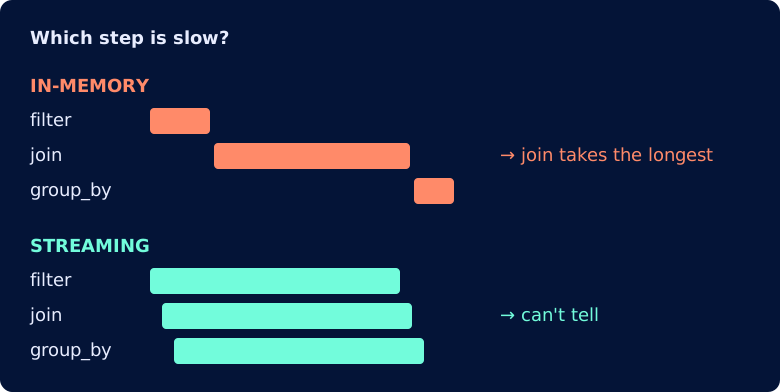
So Polars 2.0 removes the method. There is no replacement in open-source Polars yet, but the Polars team is working on one.
Switch Back to the In-Memory Engine
If a query still depends on the in-memory engine's behavior, you can switch back to it for that query:
summary = query.collect(engine="in-memory")
Or make it the default for every collect() that follows:
pl.Config.set_engine_affinity("in-memory")
Note that this doesn't bring back profile(), which is removed in 2.0.
Stricter Types: Fewer Silent Conversions
Polars 1.x converted between some types on its own, sometimes losing information along the way. Polars 2.0 either keeps the exact value or raises an error.
Casting Strings to Dates
The cast method converts a column from one type to another, such as Int32 to Int64. In Polars 1.x, it could also convert strings to dates, but only in the YYYY-MM-DD format. Dates in any other format, like these US-style ones, fail:
dates = pl.DataFrame({"pickup_date": ["01/15/2024", "01/16/2024"]})
dates.with_columns(pl.col("pickup_date").cast(pl.Date))
Polars 1.44.2 raises an error:
InvalidOperationError: conversion from `str` to `date` failed in column 'pickup_date'
for 2 out of 2 values: ["01/15/2024", "01/16/2024"]
Polars 2.0 removes string-to-date casting entirely and recommends str.to_date() instead. Unlike cast, it takes a format string, so it can read dates written in any format, including US-style dates:
dates.with_columns(pl.col("pickup_date").str.to_date("%m/%d/%Y"))
┌─────────────┐
│ pickup_date │
│ ---         │
│ date        │
╞═════════════╡
│ 2024-01-15  │
│ 2024-01-16  │
└─────────────┘
Adding Large Integers Without Rounding
Adding a signed integer (one that allows negatives) to a UInt64 (an unsigned one, which doesn't) used to produce a float. Floats can't store very large integers exactly, so large values were rounded.
For IDs, even a small rounding error is a big problem, because it usually goes unnoticed. For example:
ids = pl.DataFrame({
    "trip_id": pl.Series([2**53 + 1], dtype=pl.Int64),  # 9007199254740993
    "offset": pl.Series([0], dtype=pl.UInt64),
})
ids.select(pl.col("trip_id") + pl.col("offset")).item()
polars 1.44.2 9007199254740992.0 Float64 <- ID is off by one
Polars 2.0 uses Int128 instead. It's still an integer, so nothing is rounded, and it's wide enough to hold both negative numbers and very large positive ones:
polars 2.0.0 9007199254740993 Int128 <- ID is exact
This means IDs stay exact after arithmetic, so joins and lookups on them still match the right rows.
Matching Integers Against Floats in is_in
Polars 1.x let you filter an integer column with a list of floats, or a float column with integers. Polars 2.0 no longer allows either:
| Column | is_in values | Polars 1.x | Polars 2.0 |
|---|
Float64 | floats | ✅ | ✅ |
Int32 | integers | ✅ | ✅ |
Int32 | floats | ✅ | ❌ |
Float64 | integers | ✅ | ❌ |
With small numbers, mixing them seems harmless. In Polars 1.x, looking up an ID with a float returns the right user:
users = pl.DataFrame({"user_id": [101, 102, 103]})
lookup = [float(102)]  # [102.0]
users.filter(pl.col("user_id").is_in(lookup))
┌─────────┐
│ user_id │
╞═════════╡
│ 102     │
└─────────┘
But with large IDs, the same lookup returns the wrong rows. Floats can't store 19-digit integers exactly, so nearby IDs all round to the same value:
users = pl.DataFrame(
    {"user_id": [1234567890123456789, 1234567890123456790, 1234567890123456800]}
)
lookup = [float(1234567890123456789)]
users.filter(pl.col("user_id").is_in(lookup))
Polars 1.44.2 returns three users for one ID:
lookup ID: ...456789

┌───────────┐
│ user_id   │
╞═══════════╡
│ ...456789 │   <- matches
│ ...456790 │   <- not asked for
│ ...456800 │   <- not asked for
└───────────┘
Polars 2.0 refuses to compare an integer column with float values, so the same code raises an error instead:
InvalidOperationError: 'is_in' cannot check for Int64 values in List(Float64) data.
This behavior is ideal. It's better to get an error now than to spend hours later debugging a silent bug.
To clear the error, make sure the lookup holds integers, not floats:
lookup = [1234567890123456789]
users.filter(pl.col("user_id").is_in(lookup))
Other API Changes
explode Drops Empty Lists
explode turns each item in a list into its own row, so an empty list should produce no rows. Polars 1.x added a null row instead:
stops = pl.DataFrame({"trip": [1, 2], "stops": [[10, 11], []]})
stops.explode("stops")
┌──────┬───────┐
│ trip ┆ stops │
╞══════╪═══════╡
│ 1    ┆ 10    │
│ 1    ┆ 11    │
│ 2    ┆ null  │
└──────┴───────┘
In Polars 2.0, the empty list produces no rows, as you'd expect:
┌──────┬───────┐
│ trip ┆ stops │
╞══════╪═══════╡
│ 1    ┆ 10    │
│ 1    ┆ 11    │
└──────┴───────┘
Pass empty_as_null=True to keep the old behavior:
stops.explode("stops", empty_as_null=True)
┌──────┬───────┐
│ trip ┆ stops │
╞══════╪═══════╡
│ 1    ┆ 10    │
│ 1    ┆ 11    │
│ 2    ┆ null  │
└──────┴───────┘
qcut Is Deprecated
qcut is deprecated, likely because it can behave unexpectedly.
Let's say you want to compare low and high tippers by splitting the tips into 4 groups of the same size using qcut(4):
tips = pl.DataFrame({"tip": [0.0, 0.0, 0.0, 0.0, 0.0, 0.0, 1.0, 2.0, 3.0, 5.0]})
tips.with_columns(group=pl.col("tip").qcut(4))
qcut(4) cuts the sorted tips at the 25%, 50% and 75% marks. Since six of the ten tips are 0, the 25% and 50% cut points are both 0. Instead of 4 groups of near-equal size, the second group would be empty:
sorted tips:  0  0  0  0  0  0  1  2  3  5
                     ▲      ▲     ▲
                    25%    50%   75%
cut points:          0      0   1.75

wanted:  [0 0 0] [0 0 0] [1 2] [3 5]      4 groups of near-equal size
qcut:    [0 0 0 0 0 0] [ ] [1] [2 3 5]    group 2 is empty ❌
That empty group is a range from 0 to 0, which no value can fall into, so Polars 1.44.2 raises an error.
qcut decides groups by value, so identical tips can never be split across groups. Polars 2.0 adds bin_ranks, which decides groups by position in sorted order, so you get 4 groups of nearly equal size:
tips.with_columns(
    group=pl.col("tip").bin_ranks(4, labels=["q1", "q2", "q3", "q4"])
).group_by("group").len().sort("group")
┌───────┬─────┐
│ group ┆ len │   <- len = number of tips in each group
╞═══════╪═════╡
│ q1    ┆ 3   │
│ q2    ┆ 3   │
│ q3    ┆ 2   │
│ q4    ┆ 2   │
└───────┴─────┘
bin_ranks splits the six 0 tips across the first two groups, so no group is left empty:
sorted tips:  0  0  0  0  0  0  1  2  3  5

qcut:         [0 0 0 0 0 0] [ ] [1] [2 3 5]    group 2 is empty ❌
bin_ranks:    [0 0 0] [0 0 0] [1 2] [3 5]      4 groups of near-equal size ✅
Final Thoughts
What I like most about Polars 2.0 is that your code gets faster without changing a single line.
Many changes also make methods specific to their use case, which prevents unexpected behavior. I like this because it saves users from debugging silent bugs later.
Of course, this means your code may start raising some errors after you upgrade. Fixing them now is worth it, because it's far cheaper to fix a known bug than to debug a silent one in production.
References