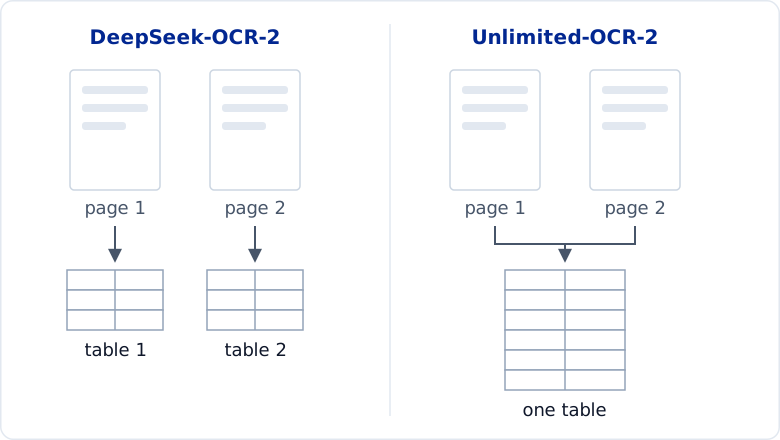
If you run OCR on a long PDF report, a table that spans two pages may come back as two separate tables instead of one. This happens because most OCR models read one page at a time, so they can't tell that a table on one page continues onto the next.
Unlimited-OCR-2 solves this by reading many pages in one request, so a table split across pages comes back as one table.
It scores well on long-document benchmarks, but benchmarks don't always reflect real-world documents. So I tested it on a long PDF report to see how good it is in practice.
💻 Get the Code: The scripts for every example are on GitHub.
What Is Unlimited-OCR-2?
Unlimited-OCR-2 is an open-source document parsing model from Baidu. It is built on DeepSeek-OCR and has the same size as DeepSeek-OCR-2. The main difference between them is how they read a document.
DeepSeek-OCR-2 reads one page per request, while Unlimited-OCR-2 reads many pages in one request:
How Can a Model Read Across Page Breaks?
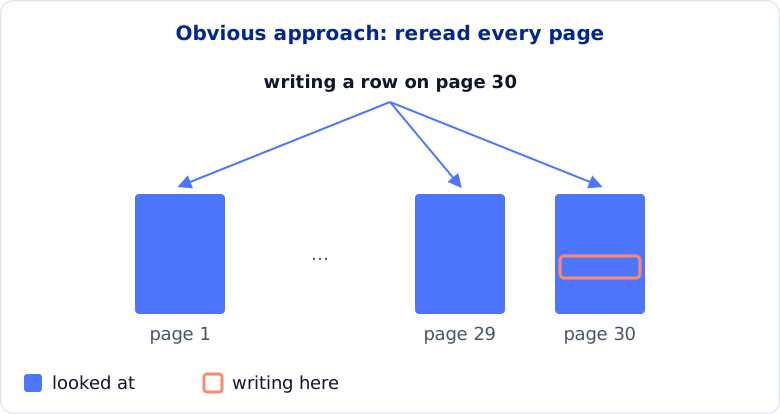
The obvious way to let a model see across a page break is to have it look at every page while it writes. But then the model would reread every page before writing each word, which gets very slow for long documents.
Unlimited-OCR-2 avoids this slowdown by:
- Splitting each page into small bands and summarizing each one
- Before each word, checking which bands are most relevant to what comes next. This check is quick because it looks only at the summaries, not the full bands.
- Reading only the most relevant bands in full
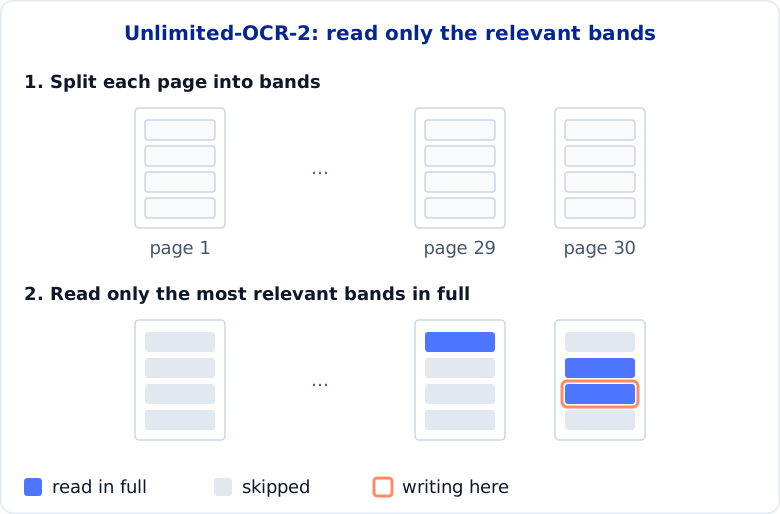
Because the number of bands it reads in full stays small no matter how long the document is, each word gets only a little slower to write as you add pages. In Baidu's tests at 100 pages, each word was 7 times faster to write than with the read-every-page approach.
To see how well this works, I ran DeepSeek-OCR-2 and Unlimited-OCR-2 on several tables that span multiple pages. Both models are built on DeepSeek-OCR and have the same size, so differences in their outputs come mostly from whether they read across page breaks.
Setup
Unlimited-OCR-2 runs on an NVIDIA GPU through Baidu's Transformers code, or on an Apple Silicon Mac through the MLX conversion in mlx-vlm. This article uses the Mac path, but the outputs are the same format on both.
On a Mac:
pip install mlx-vlm==0.7.11
On an NVIDIA GPU, follow the model card's Transformers setup.
Parse Many Pages in One Request
The first test is the simplest: give the model the two pages around one split table, and see whether it can recognize them as one table.
The tests use the Federal Reserve's 2024 Annual Report, a 214-page report with many tables that cross a page break. Its Table 5.3 starts on page 71 and continues on page 72, with its header repeated.
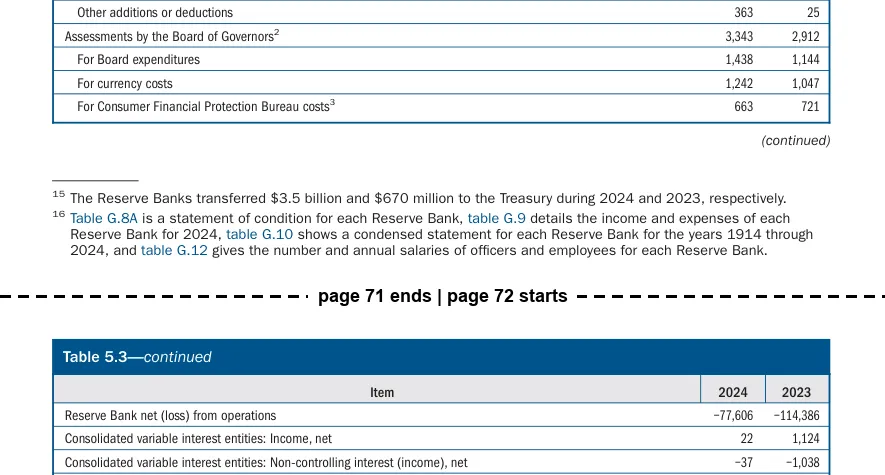
A page-by-page model like DeepSeek-OCR-2 parses each page separately, so these two pages come back as two tables. The first one ends at the bottom of page 71:
| Item | 2024 | 2023 |
|---|
| ... | | |
| For currency costs | 1,242 | 1,047 |
| For Consumer Financial Protection Bureau costs | 663 | 721 |
The second one starts with the page title and the header as ordinary rows:
| Table 5.3—continued | | |
|---|
| Item | 2024 | 2023 |
| Reserve Bank net (loss) from operations | -77,606 | -114,386 |
| Consolidated variable interest entities: Income, net | 22 | 1,124 |
| ... | | |
Before you can use the table, you have to delete the extra title and header rows from the second table, then join the two tables yourself.
Now let's try Unlimited-OCR-2. Pass both page images to mlx_vlm.generate in one call, with the prompt Multi page parsing.:
mlx_vlm.generate --model mlx-community/Unlimited-OCR-2-8bit \
  --image p071.png p072.png \
  --prompt "Multi page parsing." --max-tokens 8000
This prints one <PAGE> section per image, each containing a list of blocks. The model uses the label append_table to indicate that the table on page 72 is a continuation of the table on page 71.
<PAGE>                                                        <- page 71
<BLOCK>table[144, 460, 855, 817]<FORK><table>...
<PAGE>                                                        <- page 72
<BLOCK>append_table[145, 137, 855, 535]<FORK><table>...       <- continues the table above
The raw output is hard to read, so I use Baidu's Markdown converter. It uses the append_table label to join the two halves into one table. Here are the rows around the page break:
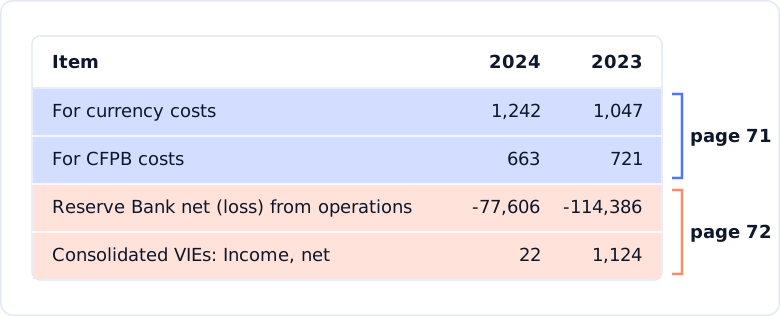
The two halves are merged into one table, with no repeated header between them.
Merge a Table Across Four Pages
Let's make the test harder by running the model on a table that spans four pages (Table G.10).
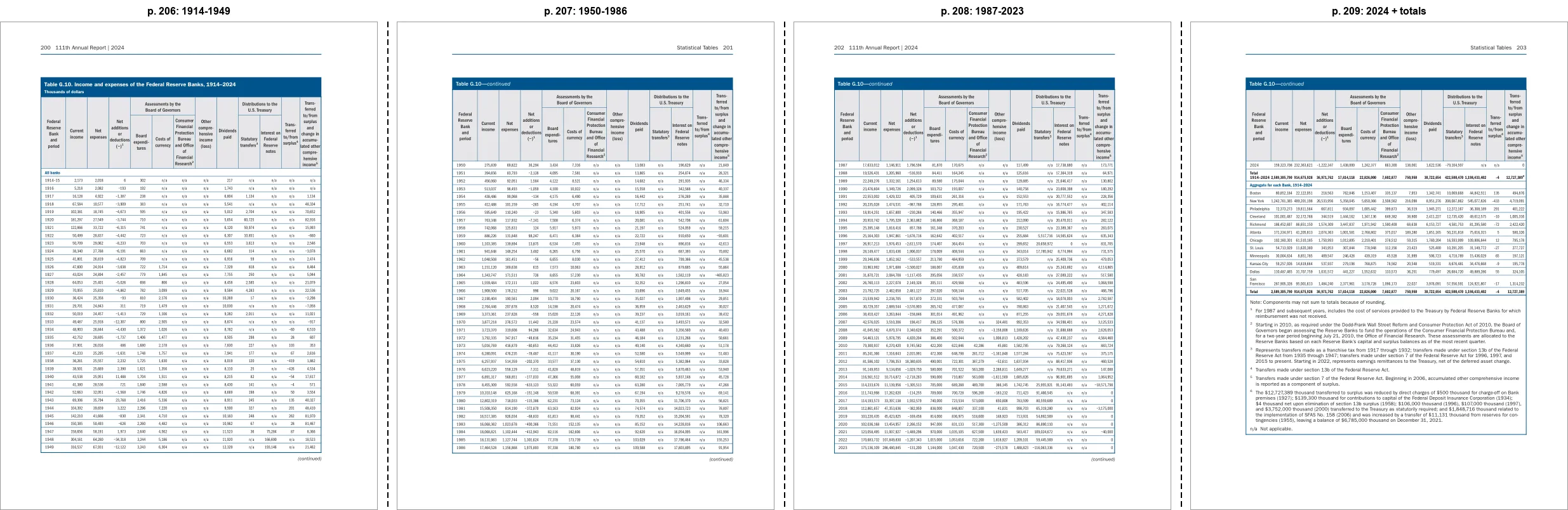
DeepSeek-OCR-2 returns four separate tables, one per page.
Unlimited-OCR-2 returns one table for all four pages, with only one repeated header row left between 1986 and 1987:
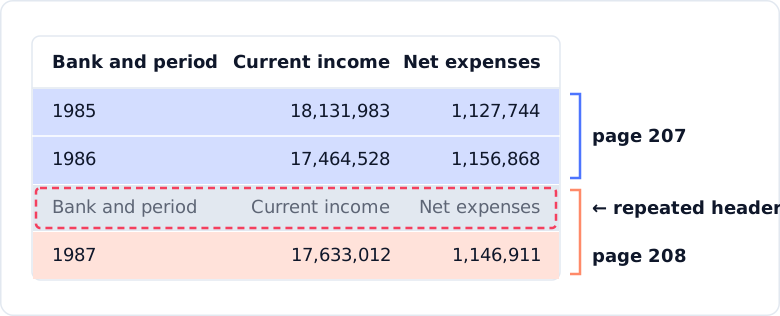
The result isn't perfect, but deleting one row is far less work than cleaning and joining four separate tables.
Join Paragraphs Across Pages
Page breaks cut paragraphs in half too. Let's see whether the model can rejoin them.
For this test, I switched to a different report. This paragraph in the Federal Reserve's June 2025 Monetary Policy Report stops at "highly accommodative" on page 54 and continues on page 55:
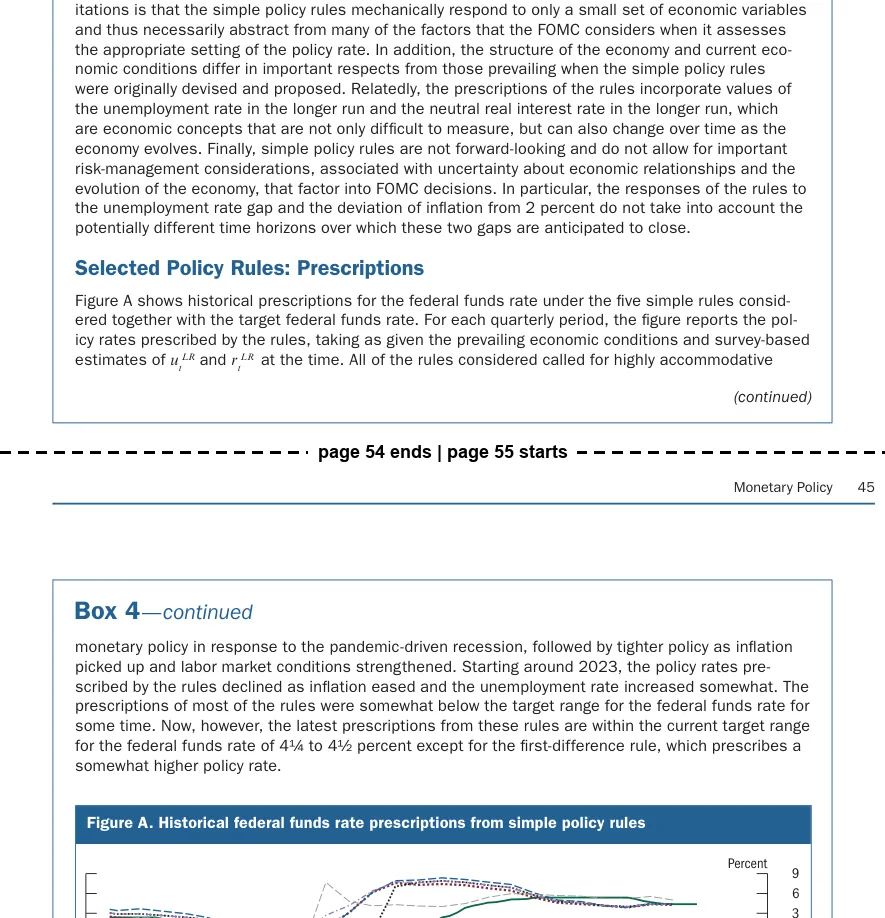
DeepSeek-OCR-2 leaves the sentence split, with the box title from page 55 in the middle:
...called for highly accommodative                                <- end of page 54

Box 4—continued                                                   <- box title repeated on page 55

monetary policy in response to the pandemic-driven recession...   <- start of page 55
Unlimited-OCR-2 returns one paragraph but loses the space at the page break:
...called for highly accommodativemonetary policy in response to the pandemic-driven recession...
                                  ^ space lost at the page break
I also tested two other paragraph breaks, and Unlimited-OCR-2 left both sentences split, just like DeepSeek-OCR-2. So paragraph merging seems less reliable than table merging.
Send a Whole Section at Once
So far, I gave the model only the few pages around one break. In practice, you would send a whole section of a report and let the model find the breaks.
Let's test how well the model can find breaks in longer requests by sending 10- and 30-page chunks of the Annual Report in one request each:
mlx_vlm.generate --model mlx-community/Unlimited-OCR-2-8bit \
  --image pages/p185.png pages/p186.png ... pages/p214.png \
  --prompt "Multi page parsing." --max-tokens 150000
| Pages per request | Table breaks recognized |
|---|
| 2 to 4 | 7 of 7 |
| 10 | 11 of 12 |
| 30 | 20 of 22 |
Unlimited-OCR-2 recognized most breaks even in 30-page requests.
On a MacBook Pro with an M5 Pro chip, a 30-page request took 3 to 5.5 minutes and peaked at about 17 GB of memory, so you can parse a long report on a laptop without a GPU server.
Final Thoughts
From my tests, Unlimited-OCR-2 is a great tool for parsing long PDFs. It can read across page breaks and join tables that span multiple pages.
It also runs on a laptop. With mlx-vlm, a 30-page request fits in about 17 GB of memory, so private documents never leave the machine.
But how does it perform on single pages? On OmniDocBench v1.6, a single-page benchmark, it scores about 3 points below the best single-page models but above DeepSeek-OCR-2:
| Model | Overall score |
|---|
| TeleOCR (best) | 96.91 |
| OvisOCR2 | 96.47 |
| Unlimited-OCR-2 | 94.02 |
| DeepSeek-OCR-2 | 90.25 |
A 3-point gap is small, so if you're not sure whether your documents have page breaks, Unlimited-OCR-2 is a good default.
References