What Hardware Do I Get!?

Tech Lowdown with Dillon Roach

Hi friends, and welcome back. I’ve had so many conversations with folks that essentially boil down to “I am interested in genAI, I’d like to run things locally, but what hardware do I need to ” – I still love those conversations and look forward to many more, but I’ll be sending folks here first as homework (hi! hah).
Before we dive in, let me set the stage just a bit so we don’t run off down rabbit holes all day: for this particular conversation I’m going to presume, you’re relatively conversational in some of the tech terms around computers and models you might want to run, and
a) The primary focus is genAI – getting a great machine that can do all the other fun things may come along for the ride, but I’m not trying to optimize your gaming FPS.
b) You’re mainly focused on using models that already exist – you might want to occasionally dabble in some fine-tuning/LoRA work, but you’re not looking to build The Training Rig.
As an added note, if you’re reading this in June 2026, when I wrote this, you sure picked a bad time to want to be doing this (and let’s all hope that remains a true statement later and things didn’t just get ~even worse~). If that statement has you scratching your head, it’s all about RAM and memory shortages: for example what used to be roughly steady at ~$250 for two sticks of 32GB RAM, now averages over $1k. There was a moment where folks saw painful GPU prices and built huge CPU+system-RAM builds. Can’t say that sounds as enticing right now; and it was super niche to begin with.
In very rough terms, right now, there are two categories of models you might be looking to run: LLMs (+things based on LLMs), and diffusion models. For the ‘things based on LLMs’ some speech models are really LLMs under the hood, they just produce tokens that get decoded to audio, instead of tokens that become text; so are some image models. Diffusion models are typically your image and video generators (to make matters more confusing, there are diffusion based LLMs, google just released one this morning, but they’re still somewhat research-y and a lot less likely to be the one you’ve just reached for).
For the diffusion models, you have two things you care about: do I have enough VRAM to fit the models I want (or unified memory if you’re on a Mac, or the new Windows+Arm boxes, etc). And does the compute have some proper oomph (technical term). This one’s easier, because you go look up your favorite image model that you’re wanting to use, while also considering there will be a new shiny in 4 months that might be a touch larger, and see how much VRAM you want to aim for – then in very rough terms, go look up gaming benchmarks for the machines you’re considering and see how much speed is worth your hard earned dollars. More is always more, you’ll never not want more; you just have to figure out where your budget and dreams align.
Now, for the slightly trickier task – LLMs. Because of the way LLMs are designed, every parameter in every layer of the model is essentially being read (in entirety) for every new word that is produced. There is computation going on, and more so if you want to serve your model to all your office friends, but for the majority of cases, you are almost entirely memory bandwidth bound. This means your tokens-per-second is nearly entirely dependent on how fast your GPU (Mac silicon, Arm, etc) can read that entire model through to its processor: memory bandwidth. If you are in the market to buy a machine that wants to run LLMs, you need to get very familiar with that term: memory bandwidth. You’ll be googling it a lot.
To set rough expectations: on a NVIDIA 3090 (top of consumer line September 2020) the device has ~936GB/s memory bandwidth – this translates to (roughly) ~40 tokens/sec on dense models like qwen3.6-27B, ~100+/-20 tokens/sec on an MoE* like qwen3.6-35b-a3b. The latest flagship 5090 has ~1800GB/s memory bandwidth, so you’d expect about double the tokens/sec. That roughly plays out, as expected, with the caveat that, yes, I’m being somewhat hand-wavey with the other things going on which do impact real numbers.
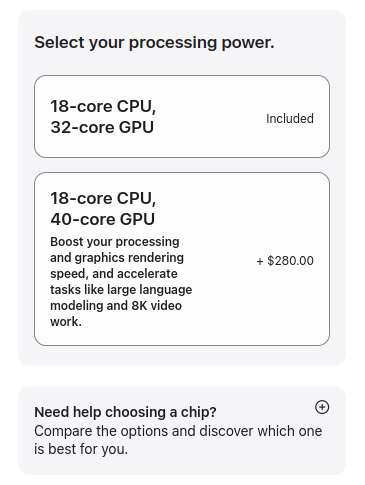
If you’re in the market for a Mac laptop, mini, or studio – they do show you the memory bandwidth of your options, and you’ll want to look: https://www.apple.com/mac/compare/ for example, the current m5 Air (153GB/s), and m5 Neo (60GB/s) advertise as ‘Built for AI,’ but they clearly mean different things than I usually do – any model but the smallest and you’re going to be waiting. Mac has the bandwidth, the M5 Pro goes ‘up to’ 614GB/s, the M3 Ultra up to 819GB/s – but do look very closely at the exact chip-set you’re selecting when you go to buy. The same ‘M5 Pro’ (for example) has 460GB/s if you’re getting the 32-core GPU variant, while the 40-core GPU option hits the 614GB/s ‘up to.’ Currently (and the UI is sure to change) that can be found by clicking the + icon next to ‘need help choosing a chip?’ The real Mac silicon value is being able to get ‘pretty reasonable’ memory speeds while getting huge unified-memory numbers to run the big models with (Apple.. Bring back 256 and 512GB options..)
One final note – while tokens-per-second is often the piece that ‘shows’ most obviously in how fast the words come streaming out of an LLM – the ‘pre-processing’ stage is where the compute needs to handle the entire context that comes before your new generate words. For short chat-like conversations, this won’t be a huge issue; but, if you want to run ‘agent’s (or for coding) where the context sizes easily go into the 100k+ token ranges, that all falls squarely on your ‘compute’ again – faster chips win the day. Where that 3090 might run 1-to-a-few thousand tokens-per-second in pre-processing, the older Mac silicon will go at paces in the lower 100s – this could mean minute(s) of waiting before the first tokens start streaming out.
Again, look at real benchmark numbers when talking about real purchases, but this should hopefully give you the vocabulary for what you’re looking for and care about. Prices are wild out there, so best of luck, but if you’re genAI curious and want to start taking more control of what and how things are run, having the hardware right next to you is hard to beat.

*MoE = mixture of experts, a subset of parameters are used for each token, so considerably less ‘model’ needs to be read through memory bandwidth with each new token generation.

Share:

Related Articles