
Becoming a Frame Evangelist
The recent open weights letter didn’t introduce a new idea, it confirmed ours: the future of AI belongs to organizations that own their intelligence.
Control
Tech Lowdown with Dillon Roach

I’ll be brief. I value your time. You’re in control.
For those of you following this series, I hope you’ve had the chance to go hands-on with some of the best proprietary models by now. The leading paid models are quite useful at this point and will continue to improve. But, you don’t own them – you rent them as a utility and have limited control over their behavior, availability, and handling of your private data. They’re still great services and I use them myself, but for certain things you need to run on your own hardware. What you’re able to run will naturally depend on what computer resources you have available, but I hope to at least give you some of the tools and language to help get you going.
For folks feeling a bit more tech-savvy-adventurous, LibreChat or Open WebUI can serve as frontend to llama-cpp handling the model inference. In this case you’ll need to find your own models and download them yourself; taking https://huggingface.co/unsloth/Qwen3.5-35B-A3B-GGUF as an example – you’ll see in ‘Files and Versions’ that there are multiple versions of the same model saved and available. These are distinct ‘quantizations’ – different compressions of the full precision weights – you only need to download one .gguf file. The naming convention is confusing, but don’t get too caught up at first – you generally want any Q4 or above that will fit on your device. Huggingface has a size rubric for each model on the model card (example below) – anything green or yellow is a good pick, and if there’s nothing 4-bit and above that’s either, it’s likely time to go hunting for a smaller model.
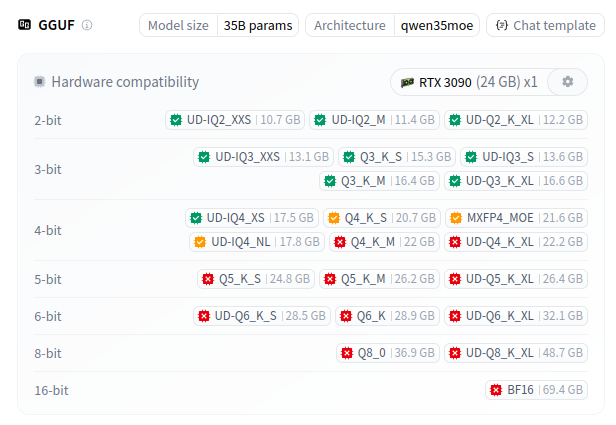
As a final note – starting out, you should likely look for a Mixture-of-Experts (MoE) model, especially if you’re on an M-series Mac – these models are large in total parameters, but only use a small subset of them for each new token, so they’re fast and efficient. You’ll recognize them by the naming pattern similar to Qwen3.5-35B-A3B – the 35B is the total number of parameters (those will need to fit into memory) while the A3B says that for each token only 3B of those total 35B are active.
The recent open weights letter didn’t introduce a new idea, it confirmed ours: the future of AI belongs to organizations that own their intelligence.
We use cookies to improve your experience on this website. You may choose which types of cookies to allow and change your preferences at any time. Disabling cookies may impact your experience on this website. You can learn more by viewing our Cookie Policy.