Building a JupyterLab plugin usually starts with small experiments - you test your ideas, change a few lines, reload, and repeat. Learn how we integrated AI into the Playground AI to help with this process.
Plugin Playground was built for this kind of fast iteration. The new AI integration makes it even easier by combining AI assistance with Playground actions in one workflow.
AI can help across the full plugin lifecycle, from first idea to a shareable result.
What Plugin Playground Does
Plugin Playground is a workspace for rapid plugin prototyping inside JupyterLab. Instead of setting up a full extension project first, you can work directly in an editor tab and run your plugin quickly.
Key capabilities include:
- creating a starter plugin file
- loading the current file as an extension
- reloading quickly while editing
- exploring extension points like tokens and commands
- opening extension examples for reference
- exporting your work as an extension package
- sharing plugin code via link
This keeps the loop very short: write, load, test, refine.
What Plugin Playground AI Integration Adds
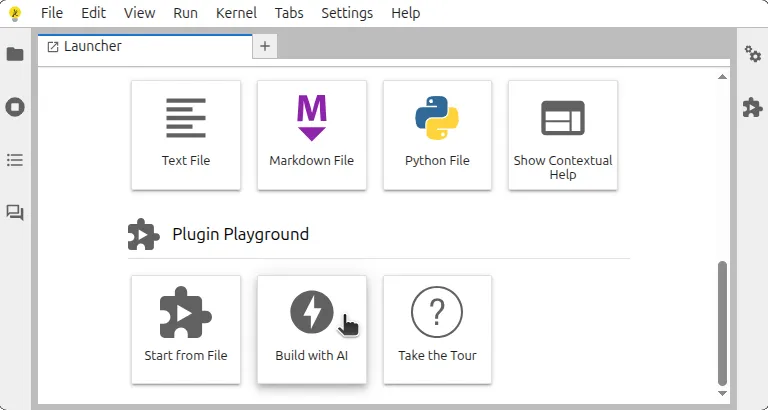
Plugin Playground supports AI-assisted prototyping in local JupyterLab and in online deployments that require no installation: Binder (a hosted JupyterHub environment) and JupyterLite (a serverless, WebAssembly-based distribution of Jupyter). Once your provider and model are configured, AI can help with all major steps.
1) Create plugin code quickly
You can describe a feature in plain language and ask AI to draft a plugin skeleton. This is useful for:
- first-pass boilerplate
- command registration blocks
- token wiring
- small UI behavior logic
Instead of starting from a blank file, you start from a working draft and iterate.
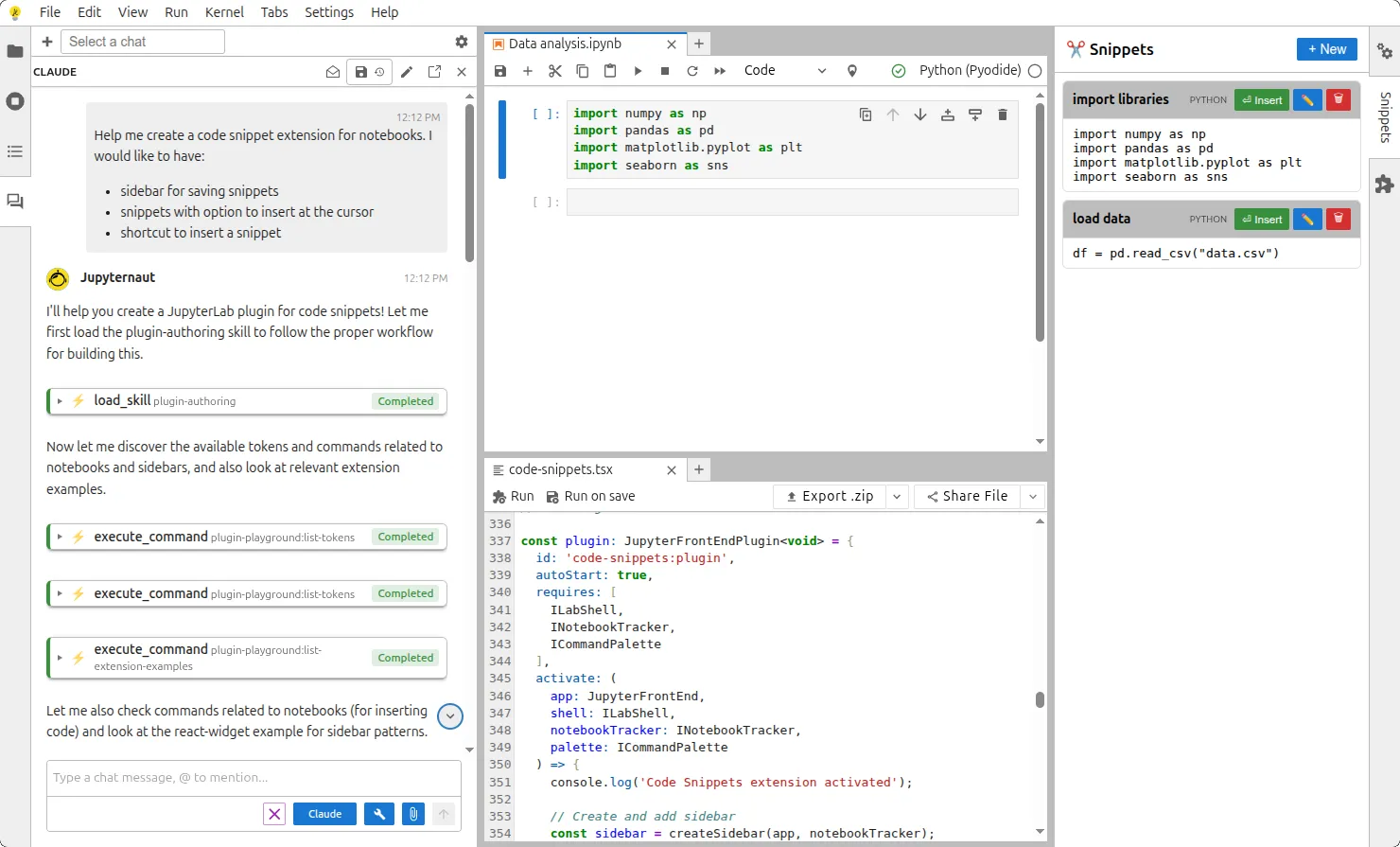
2) Refine code while you build
As you edit, AI can help with:
- cleaning up structure
- fixing small mistakes
- improving naming and readability
- adapting code when requirements change
This makes iteration smoother, especially in early prototypes where requirements keep shifting.
3) Help with extension point discovery
Plugin Playground already exposes extension context such as tokens, commands, packages, and examples. With AI, that context becomes easier to use during authoring.
You can ask AI to:
- find relevant commands for a task
- identify likely tokens for dependencies
- suggest where to integrate existing examples
This reduces manual searching and speeds up decision-making.
4) Use Playground actions with AI support
Plugin Playground actions can be used across normal editing, scripting, automation, and agent workflows.
These actions include:
- creating a new plugin file
- loading the current file as an extension
- exploring tokens, commands, and examples
- exporting your plugin work as an extension package
- sharing plugin work through a link
These actions support both authoring and operational tasks across the workflow.
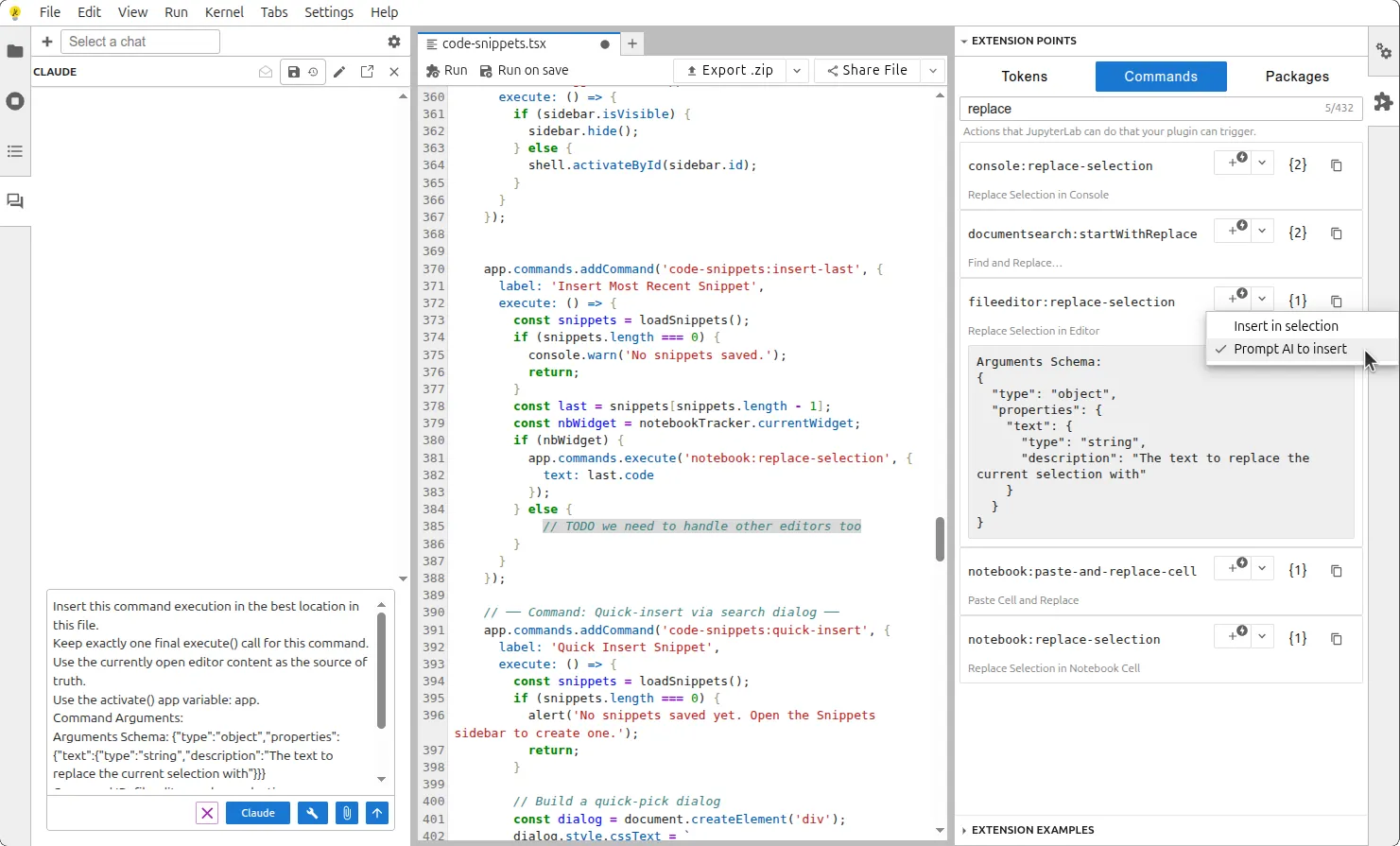
5) Insert command calls during editing
The command insertion modes are available while editing:
Insert in selection for direct placementPrompt AI to insert for context-aware placement
This helps place command calls quickly in the right context.
How We Built It
For readers who want the implementation details, we focused on four design choices.
1) Why we chose jupyterlite/ai over jupyter-ai
We wanted one integration layer that works across local JupyterLab, Binder, and JupyterLite with minimal environment-specific branching. As outlined in the Jupyter AI FAQ, both jupyter-ai and jupyterlite/ai support overlapping AI capabilities, including tool calling in Jupyter interfaces. The key architectural difference is that jupyterlite/ai does not require a server component, while jupyter-ai is server-backed and can continue workflows when a browser disconnects.
For this browser-first Plugin Playground workflow, the serverless model of jupyterlite/ai was the better fit.
2) Dedicated skill for plugin creation
We integrated a dedicated plugin-creation skill so the assistant can produce a solid first draft of a JupyterLab plugin without guessing project structure each time. This keeps generated code closer to Plugin Playground workflows and reduces repetitive setup.
Tool calling is wired into the same command system that powers JupyterLab UI actions. In practice, that means AI-triggered actions and manual actions both go through familiar command pathways, including create, load, discover, export, and share flows.
This approach keeps behavior consistent, makes debugging easier, and fits naturally into JupyterLab's command-first ecosystem.
4) Upstream contributions to jupyterlite/ai
We also contributed improvements upstream while building and validating this workflow:
End-to-End Workflow: From Idea to Shareable Plugin
A simple and practical flow looks like this.
Example goal: create a small plugin that adds a command to the command palette and opens a simple panel.
- Launch Plugin Playground in local JupyterLab, Binder, or JupyterLite.
- Configure AI provider, model, and API key.
- Create a new plugin from the tile/new-file flow (or start from any editor file).
- Describe your feature in plain words and ask AI for a first draft.
- Ask AI to refine behavior, command naming, and labels to match your intent.
- Use Playground discovery tools with AI guidance to check relevant tokens, commands, and examples.
- Load the file as an extension and test the behavior immediately.
- Iterate with small prompt-driven updates based on what you see in the UI.
- Package as an extension when ready.
- Share through a link for review and collaboration.
This gives you a single continuous flow from idea to working plugin, without heavy setup upfront.
Why This Matters
The biggest benefit is speed with clarity.
- New contributors can start faster because AI helps with structure and context.
- Experienced authors can move faster by offloading repetitive setup work.
- Teams can prototype, test, package, and share ideas in one place.
In short, this integration turns Plugin Playground into both:
- a fast coding environment, and
- a practical AI-assisted workflow for real plugin development tasks.
Good Practices
Even with AI, keep the basics strong:
- verify logic after each major change
- test behavior in the actual JupyterLab UI
- confirm required tokens and command usage
- iterate in small steps so regressions are easy to catch
AI should speed up engineering decisions, not replace verification.
Closing Thoughts
Plugin Playground already made JupyterLab plugin prototyping easier. With broader AI integration, it now helps across creation, refinement, discovery, testing, packaging, and sharing.
If you want to build plugin ideas quickly and collaborate on them early, this workflow is one of the most practical ways to do it.